將 Codex 與 Agent Redactor 搭配使用
-
設定 Agent Redactor(請先執行此步驟)
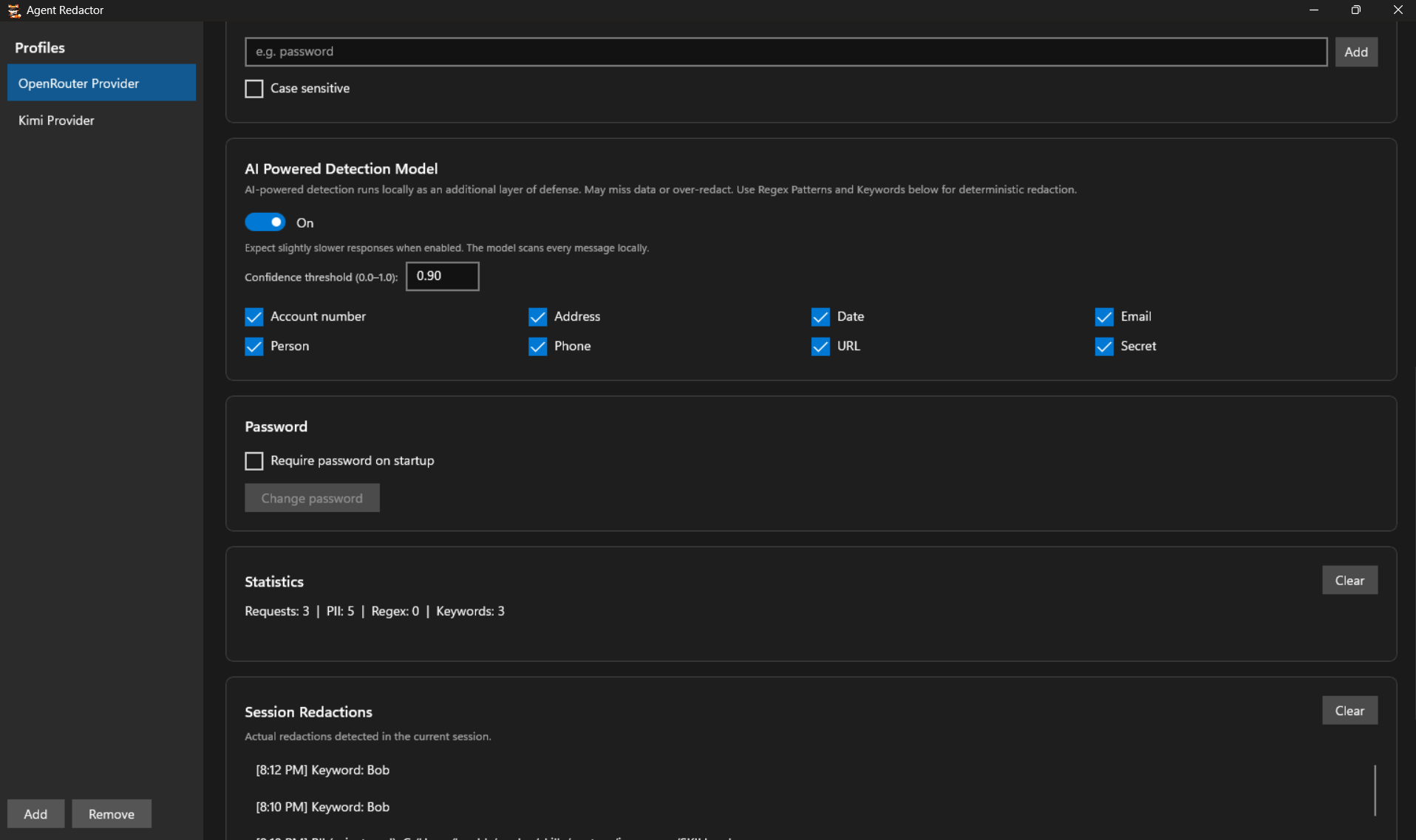
在設定 Codex 之前,請先啟動本機遮蔽代理,以便 Codex 透過它進行連線。在 Profiles 側邊欄中選取或建立一個設定檔。將 Local URL 設定為
http://localhost:8080/(或您偏好的連接埠),將 Forward To 設定為您的真實供應商端點(例如https://openrouter.ai/api/v1),並貼上您的真實 API Key。金鑰在本機加密,絕不會離開您的電腦。按一下 Save All Settings,並確認連接埠顯示為可用。 -
選擇您的遮蔽規則
在資料離開您的電腦之前,決定要遮蔽哪些內容。您可以啟用 AI Powered Detection Model 並勾選需要偵測的 PII 類別,新增 Regex Patterns 和 Keywords 進行確定性符合,或使用三者的任意組合。選擇權在您。Regex 和 Keywords 也適用於 AI 模型可能遺漏的特定專案機密。
-
將 Codex 指向 Agent Redactor
Codex 從 TOML 設定檔讀取其供應商。在 Windows 上開啟
C:\Users\<you>\.codex\config.toml(其他系統為~/.codex/config.toml),如果尚不存在則建立它。新增以下內容,同時保留您現有的設定:model_provider = "agentredactor" model_reasoning_effort = "high" model = "nvidia/nemotron-3-ultra-550b-a55b:free" [model_providers.agentredactor] name = "agentredactor" base_url = "http://localhost:8080/" [model_providers.agentredactor.auth] command = "sh" args = ["-c", "echo $AGENTREDACTOR_API_KEY"]
- base_url: 必須與 Agent Redactor 中的 Local URL 完全一致。
- model: 將
nvidia/nemotron-3-ultra-550b-a55b:free替換為您供應商的確切模型名稱。 - model_reasoning_effort: 選用。依您的偏好設定,或完全刪除該行。
- [model_providers.agentredactor.auth]: 告訴 Codex 透過執行列印
AGENTREDACTOR_API_KEY環境變數的 shell 命令來取得其 API 權杖。預留位置值即可,因為 Agent Redactor 已安全保管您的真實 API 金鑰,並在上游注入。
-
設定預留位置 API 金鑰
即使代理不需要真實金鑰,Codex 也期望權杖存在。設定環境變數:
PowerShell (Windows):
setx AGENTREDACTOR_API_KEY "placeholder"
bash (Linux):
echo 'export AGENTREDACTOR_API_KEY="placeholder"' >> ~/.bashrc
兩者都會永久儲存該變數,但只有新終端機才會讀取它(
setx會列印 SUCCESS: Specified value was saved.)。在繼續之前,請關閉並重新開啟終端機。 -
啟動 Codex 並安全地工作
從新終端機啟動 Codex:
codex
標頭應顯示您選擇的模型和推論力度。現在,所有外送要求在接觸網際網路之前,都會先透過 Agent Redactor 在本機過濾。在下方範例中,模型只在原本姓名的位置收到了遮蔽後的預留位置。
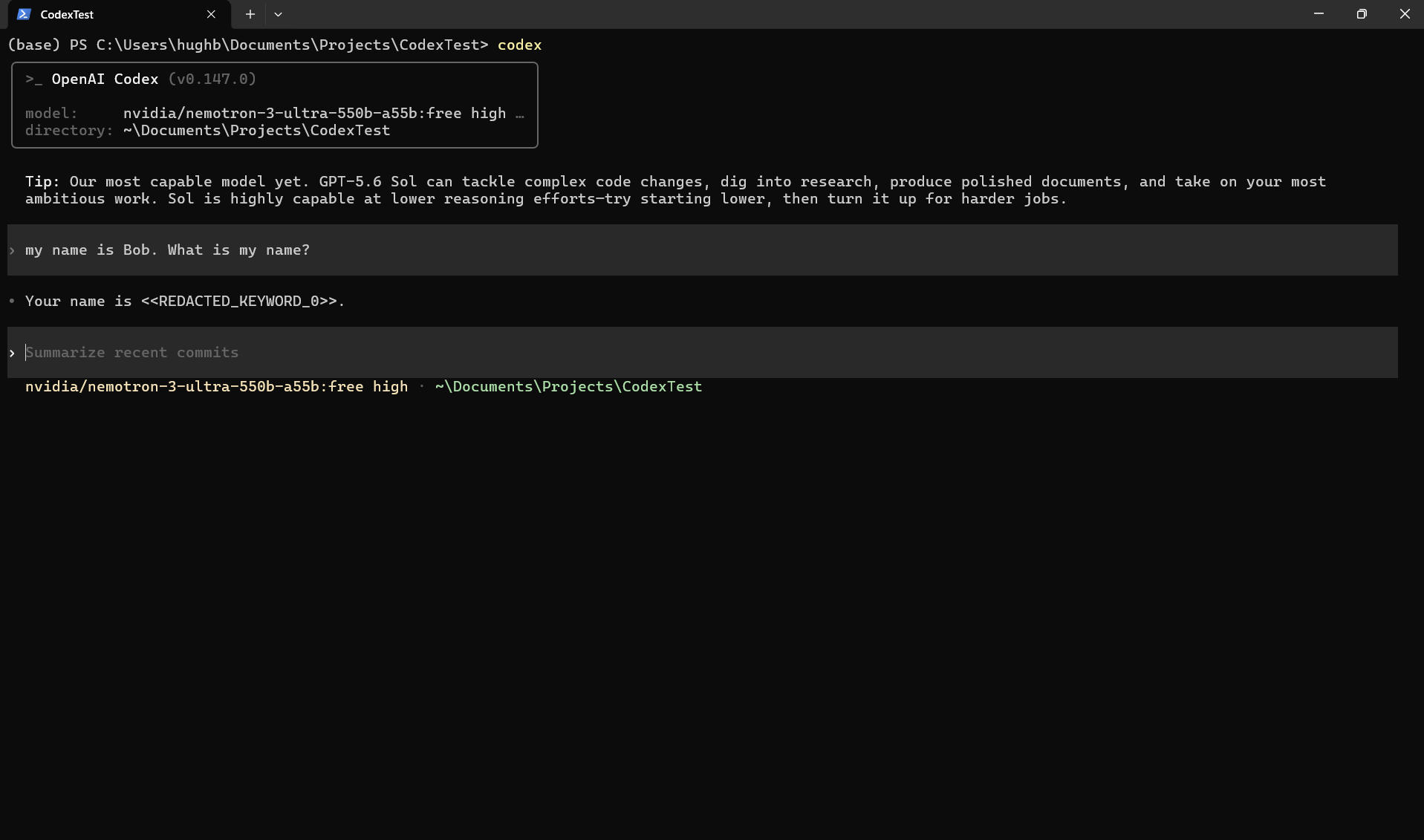
Codex 正透過代理執行。模型收到的是遮蔽後的預留位置,而不是真實姓名。
驗證遮蔽
查看 Agent Redactor 中的 Session Redactions 面板,精確了解攔截了哪些內容。